
Read me
The purpose of this documentation is to guide the developer on how to integrate with the Muxi APIs, describing the features and methods to be used, listing information to be sent and received through examples and with a simple and accessible language. This will require only basic programming language skills for the Web, HTTP / HTTPS requests, and JSON file manipulation to interact with our APIs.
In this manual, you will also find reference on all operations available in the Muxi REST API. These operations must be performed using your specific key (authorization token) at the respective endpoints below. To perform an operation, combine the base URL of the environment with the endpoint of the desired operation and send using the HTTP verb as described in the menu item SENDING A TRANSACTION. If these terms are complex for you, read the subitem WHAT IS WEB SERVICE?.
For ease of integration we provide a Sandbox environment so you can test before changing the environment for production. After development, access must be modified to the productive environment.
| SANDBOX | PRODUCTION | |
|---|---|---|
| Requests | https://hmg-clearent-gw.muxipay.net.br | https://ecommerce.muxipay.net/ |
| Queries | https://hmg-transaction-api.muxi.net.br | https://transaction.muxi.com.br/ |
CNP Transactions
Card not present Transactions (CNP) allow digital companies to conveniently sell their digital products or services to customers around the world. Our APIs provide a secure environment for doing this type of transaction and thereby leveraging your business.
Through the payment gateways, the customer enters their card information, which is sent to the card companies and financial institutions, and from there the bank confirms that there is a limit available and approves or denies the purchase in seconds.
But is it safe?
Y-E-S !! We at Muxi know how bad it is to be deceived. When we use a service we do not start thinking that it can go wrong, that they can take us for a ride, and that’s certainly not what we offer our customers. We are committed to our users and partners to always seek the highest standard of security with regard to payments. Want to know how we do this?
-
PCI -> We follow 100% of the standards defined by PCI. The Payment Card Industry - Data Security Standard is a security standard, aimed at the payment card industry, which defines security models through standards that must be followed strictly. This certification is required for any company that stores, transmits or processes sensitive information from cardholders. Data such as name, card number and security code should be encrypted for the security of cardholders. And since we want you to feel secure, we are a fully PCI-DSS certified company.
-
Encryption -> All sensitive data passing through our gateway is protected through the certificates used during the transaction. We use HTTPS, which is an implementation of the HTTP protocol over an additional layer of security that uses the SSL / TLS protocol. This additional layer allows the data to be transmitted over an encrypted connection and that the server and the client are authenticated through digital certificates.
-
Token -> We do not save the card data, they are tokenized. Tokenization enables the use of carrier card data securely and compliant with PCI-DSS standards. The basic concept is to send the customer’s card data directly from his browser to Muxi and then retrieve a token representing the card in question. Read the Tokenization subitem and be on the safest way to make a payment nowadays.
Merchant Authentication
To use our services, you need to authenticate yourself by generating a token. To generate our authentication token we are based on the specification JWT.io, so its size is variable according to the generation of it.
How do I get this token?
To receive an authentication token, contact the Muxi operational team. We will be happy to assist you and clarify any pending questions.
Where do I use this token?
After receiving a token, it must be added to the HTTP Authentication header according to the environment we want to access. The following is an example of a curl command to perform a query for transaction cycles.
curl --request GET --url https://hmg-transaction-api.muxi.net.br/v1/financial_cycles --header 'Authorization:<token>'
What is Web Service?
Webservices allow two (or more) machines to communicate over a network. Here’s an example:
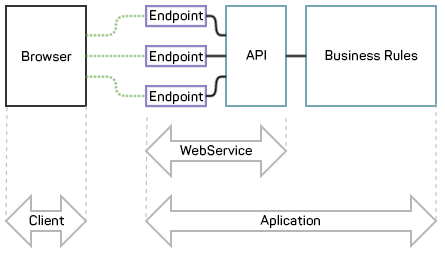
For a deeper explanation, imagine the following scenario: Your company trades dollar-denominated products whose value fluctuates daily. It is extremely important that you have these values updated so that you make decisions that bring you the best results. You can hire a trainee to update these values manually, or you can consume a service that provides you with that information automatically and reliably.
This is the webservice service. You ask a question “How many reals are worth a dollar today?” And he responds. This process, at the communication level, is based on requests based on the HTTP protocol. There is a specific URL, which we call the endpoint, on a server that is always waiting for the question, and if it is done correctly, it responds. We call this endpoint URL because it is rather a URL, but it has several “endings” that specify exactly where you want to go. Imagine as if the URL were the address of a street and the endpoint was the house number, and inside each house there is a service. For example, in a house you deliver the flour, eggs, milk and return a cake; in another house you deliver the fabric, thread, needle and return a garment. After the outfit is ready, you can still go back into the house to make an adjustment, or add an embroidery. Just as there are homes you can throw your clothes off if you will not use more. There are also the houses where you consult the quantities of clothes you have requested. This will all be translated into verbs. For example:
- Make a outfit / transaction -> POST
- Check how many clothes / transactions have already been made -> GET
- Change / adjust an outfit / transaction -> PUT
- Delete / Throw away an outfit / transaction -> DELETE
Remember that the question (or request) must be made correctly, otherwise the webservice will not be able to understand the request. Use this documentation to see if your data is correct and there is nothing missing. There is also an example of a downloadable functional JSON file that you can purchase with what you are using.
Tools
Postman
To streamline communication tests with our APIs, any HTTP client can be used. Here at Muxi, we use Postman; because in addition to serving our needs very well, it is more widespread in the community. This client allows you to configure and test before you even start developing integrations like the Muxi APIs. In the case of Postman, there is a well-developed documentation explaining how to use the tool. It also generates for the developer code examples in some languages, such as:
- ASP
- Net
- Java
- PHP
- Ruby
- Python
JSONLint
To validate whether the generated JSON object is valid by default, we can use various tools. Here in Muxi, we use JSONLint, because it is web and has a simple interface to be understood.
SDKs
For those of you using the Java language we are developing SDKs (Software Development Kit) to make it easy to integrate with our APIs.
Introduction
What is a Transaction?
From the application point of view, the transaction is an operation consisting of a series of instructions or procedures that must be performed together. This kind of circumstance is due to instructions that only make sense when performed together. Our application offers various types of transactions such as initialization, authorization, reversal, tokenization etc. Every time data is sent to API and something is answered, we will have a transaction; but if monetary values are involved in this transaction, we will have a financial transaction.
Financial transaction is a commercial transaction that consists of exchanging a good or service for a certain amount of money. The term also refers to the very technical operation of the database that performs a series of operations. However, the most common meaning refers to the exchange of goods, a specific circumstance of economic activity.
Examples of financial transactions:
- Authorization / Sale
- Pre-authorization
- Pre-authorization Confirmation
- Pre-authorization Cancellation
- Reversal
- Refund
- Recurrence
- Cancellation of Recurrence
- Transfer
- Transfer Cancellation
Examples of non-financial transactions:
- Initialization
- Carrier Registration
- Tokenization
What do I need to complete a financial transaction?
We have several means of sending a financial transaction. To accomplish this, we must first generate a transactional token. When you receive the authentication token, you will also receive a KEY API. In possession of this data, it will send a startup message, thus obtaining the transactional token that is valid for 1 hour, if it generates another, the previous one is invalid.
Calm down! Tell me more about Transactional Token!
Of course! The transactional token is a unique key that identifies to our system who you are! Every time you want to transact, you start by initializing with the authentication token in the Authentication field of the HTTP header. The response from this initialization will generate the transactional token for you. You will copy this transactional token and replace the authentication token that was in the Authentication field of the header with that new token. With this, you will be able to do all other transactions, see an example below. The transactional token is valid for 1 hour, so at the end of this time, you need to initialize again to get a new token and return to normal trading.
HTTP Header
Every request needs a header containing the following detailed information:
- Content-Type -> Indicates the format of the request body.
- Accept -> Indicates the expected return type.
- Authorization -> The field is populated by two possible values: + Authentication Token -> If it is a startup. + Transactional Token -> If it is any other transaction except initialization.
Example
| HTTP Header |
| Contact Us | Value |
|---|---|
| Content-type | application / json |
| Accept | application / json |
| Authorization | transactional token or authentication token |
Initialization
POST /v1/initialization
Initialization is a process used to provide the necessary configurations to leave the virtual terminal operative, so that it can carry out the desired transactions. Can not transact before initialization occurs.
In possession of the data, authorization token and api key, we must perform an HTTP/HTTPS request for the endpoint initialization.
Request
| Body |
| Name | Type | Required | Description |
|---|---|---|---|
| apiKey | String | Yes | API identifier |
Example
{
    "initializationRequest": {
        "apiKey": "94a08da1fecbb6e8b46990538c7b50b2a4"
    }
}
Response
| Body |
| Name | Type | Required | Description |
|---|---|---|---|
| code | String | Yes | Identifies if the initialization was accepted |
| currencyList | List | Yes | Listing with currency types |
| transactionalToken | String | Yes | Transactional token valid for 1 hour |
Example
{
    "initializationResponse": {
        "code": "ACCEPTED",
        "currencyList": ["USD"],
        "transactionalToken": "67b04d61fedcb6e324642053f47b50c43b"
    }
}
Sale
POST /v1/authorization
Authorization is the most traditional financial transaction possible. It is our famous sale, that is, the exchange of a product or service for a monetary value. Authorization may be reversed or refunded if the sale is withdrawn.
In possession of the required data, transactional token, we must perform an HTTP / HTTPS request for the endpoint authorization
Request
| Body |
| Name | Type | Required | Description |
|---|---|---|---|
| String | Yes | ||
| currency | String | Yes | Currency code |
| amount | Number | Yes | Amount |
| tax | Number | No | Tax |
| orderId | String | No | Order identifier |
| note | String | No | Notes about the transaction |
| cardNumber | String | Yes | Card number |
| cardSecurityCode | String | Yes | Card secury code |
| cardExpirationDate | String | Yes | Card expiration date |
| cardHolderName | String | Yes | Card holder name |
| billingAddress.postalCode | String | No | Zip code |
| billingAddress.street | String | No | Street |
| billingAddress.complement | String | No | Complement |
| billingAddress.phone | String | No | Phone number |
Example
{
  "authorizationRequest": {
      "email": "laura.palmer@gmail.com",
      "currency": "USD",
      "amount": 10.00,
      "tax": 10.00,
      "orderId": "123456",
      "note": "Billing of streaming services",
      "cardNumber": "4111111111111111",
      "cardSecurityCode": "099",
      "cardExpirationDate": "122020",
      "cardHolderName": "Laura Palmer",
      "billingAddress": {
          "postalCode": "02472",
          "street": "509 Mt Auburn St",
          "complement": "Watertown",
          "phone": "16179244978"
      }
  }
}
Response
| Body |
| Name | Type | Required | Description |
|---|---|---|---|
| msg | String | Yes | Response message |
| code | String | Yes | Transaction response code (e.g. ACCEPTED/REJECTED) |
| authorizationCode | String | Yes | Authorization code |
| trackingNumber | String | Yes | Tracking number |
| gatewayStan | String | Yes | Gateway stan |
| rrn | String | Yes | Reference number |
| muid | String | Yes | Muxi unique identifier |
Example
{
    "authorizationResponse": {
        "msg": "Operation Successful",
        "code": "ACCEPTED",
        "authorizationCode": "099218",
        "trackingNumber": "d4d7cbc9-bf43-481b-b26b-e89aec5ebd5f",
        "gatewayStan": "000008",
        "rrn": "d4d7cbc9-bf43-481b-b26b-e89aec5ebd5f",
        "muid": "7c2cb2e0a9004a8893358b1dd7ae5b1d"
    }
}
Authorization
POST /v1/pre_authorization
The authorization of an order on the card consists of a limit check and / or balance of the card used. This transaction is used to make a limit block in the value of the authorization and this value is recorded as pending for the administrator. During the period in which the authorization amount is not confirmed, the value is unavailable for new purchases.
In possession of the required data, transactional token, we must perform an HTTP / HTTPS request for the endpoint pre_authorization
Request
| Body |
| Name | Type | Required | Description |
|---|---|---|---|
| String | Yes | ||
| currency | String | Yes | Currency code |
| amount | Number | Yes | Amount |
| tax | Number | No | Tax |
| orderId | String | No | Order identifier |
| note | String | No | Notes about the transaction |
| cardNumber | String | Yes | Card number |
| cardSecurityCode | String | Yes | Card secury code |
| cardExpirationDate | String | Yes | Card expiration date |
| cardHolderName | String | Yes | Card holder name |
| billingAddress.postalCode | String | No | Zip code |
| billingAddress.street | String | No | Street |
| billingAddress.complement | String | No | Complement |
| billingAddress.phone | String | No | Phone number |
Example
{
  "preAuthorizationRequest": {
      "email": "laura.palmer@gmail.com",
      "currency": "USD",
      "amount": 10.00,
      "tax": 10.00,
      "orderId": "123456",
      "note": "Billing of streaming services",
      "cardNumber": "4111111111111111",
      "cardSecurityCode": "099",
      "cardExpirationDate": "122020",
      "cardHolderName": "Laura Palmer",
      "billingAddress": {
          "postalCode": "02472",
          "street": "509 Mt Auburn St",
          "complement": "Watertown",
          "phone": "16179244978"
    }
  }
}
Response
| Body |
| Name | Type | Required | Description |
|---|---|---|---|
| msg | String | Yes | Response message |
| code | String | Yes | Transaction responde code (e.g. ACCEPTED/REJECTED) |
| authorizationCode | String | Yes | Authorization code |
| trackingNumber | String | Yes | Tracking number |
| gatewayStan | String | Yes | Gateway stan |
| rrn | String | Yes | Reference number, used for capture transation |
| muid | String | Yes | Muxi unique identifier |
Example
{
  "preAuthorizationResponse": {
      "msg": "Operation Successful",
      "code": "ACCEPTED",
      "authorizationCode": "099218",
      "trackingNumber": "d4d7cbc9-bf43-481b-b26b-e89aec5ebd5f",
      "gatewayStan": "000008",
      "rrn": "d4d7cbc9-bf43-481b-b26b-e89aec5ebd5f",
      "muid": "7c2cb2e0a9004a8893358b1dd7ae5b1d"
  }
}
Authorization Void
POST /v1/pre_authorization_completion
The authorization of an order on the card consists of a limit check and / or balance of the card used. This transaction is used to make a limit block in the value of the authorization and this value is recorded as pending for the administrator. During the period in which the authorization amount is not confirmed, the value is unavailable for new purchases.
The Authorization Void then represents the release of this pre-reserved limit previously. If the authorization is confirmed, it can only be canceled through the normal cancellation of sale flow.
In possession of the required data, transactional token, we must perform an HTTP / HTTPS request for the endpoint pre_authorization_void
Request
| Body |
| Name | Type | Required | Description |
|---|---|---|---|
| String | Yes | ||
| currency | String | Yes | Currency code |
| amount | Number | Yes | Amount |
| originalRrn | String | Yes | Rrn returned on authorization transaction |
| gatewayStan | String | Yes | Gateway stan returned on authorization transaction |
| muid | String | Yes | Muxi unique identifier |
Example
{
  "preAuthorizationVoidRequest":  {
    "email": "laura.palmer@gmail.com",
    "currency": "USD",
    "amount": 10.00,
    "originalRrn": "f10c3170-23f2-445f-a5be-19d180ed7e5a",
    "gatewayStan": "000006",
    "muid ": "7c2cb2e0a9004a8893358b1dd7ae5b1d"
  }
}
Response
| Body |
| Name | Type | Required | Description |
|---|---|---|---|
| msg | String | Yes | Response message |
| code | String | Yes | Transaction status (e.g. ACCEPTED/REJECTED) |
| authorizationCode | String | Yes | Authorization Code |
| gatewayStan | String | Yes | Gateway stan |
Example
{
  "preAuthorizationVoidResponse": {
    "msg": "Operation Successful",
    "code": "ACCEPTED",
    "authorizationCode": "142379",
    "gatewayStan": "000007"
  }
}
Capture
POST /v1/pre_authorization_completion
The Capture is a transaction used to effect the billing of an already reserved amount that is authorized on the card. From the moment the authorization is confirmed, the flow of the transaction becomes like a sale transaction that can be canceled by the means explained in the items Void and Refund.
In possession of the required data, transactional token, we must perform an HTTP / HTTPS request for the endpoint pre_authorization_completion
Request
| Body |
| Name | Type | Required | Description |
|---|---|---|---|
| String | Yes | ||
| currency | String | Yes | Currency code |
| amount | Number | Yes | Amount |
| originalRrn | String | Yes | Rrn returned on authorization transaction |
| gatewayStan | String | Yes | Gateway stan returned on authorization transaction |
| muid | String | Yes | Muxi unique identifier |
Example
{
  "preAuthorizationCompletionRequest": {
    "email": "laura.palmer@gmail.com",
    "currency": "USD",
    "amount": 10.00,
    "originalRrn": "f10c3170-23f2-445f-a5be-19d180ed7e5a",
    "gatewayStan": "000006",
    "muid": "9542a7a934444b59af79b792ef72696d"
  }
}
Response
| Body |
| Name | Type | Required | Description |
|---|---|---|---|
| msg | String | Yes | Response message |
| code | String | Yes | Transaction responde code (e.g. ACCEPTED/REJECTED) |
| authorizationCode | String | Yes | Authorization code |
| trackingNumber | String | Yes | Tracking number |
| gatewayStan | String | Yes | Gateway stan |
| rrn | String | Yes | Reference number, used for capture transation |
| muid | String | Yes | Muxi unique identifier |
Example
{
  "preAuthorizationCompletionResponse": {
    "msg": "Operation Successful",
    "code": "ACCEPTED",
    "authorizationCode": "099218",
    "trackingNumber": "d4d7cbc9-bf43-481b-b26b-e89aec5ebd5f",
    "gatewayStan": "000008",
    "rrn": "d4d7cbc9-bf43-481b-b26b-e89aec5ebd5f",
    "muid": "7c2cb2e0a9004a8893358b1dd7ae5b1d"
  }
}
Void
POST /v1/void
The Cancellation transaction is divided into two types: Void and Refund. In the Void Transaction, the charge of the amount is canceled, as if it had not existed, but continues to appear as voided. Already the refund corresponds to the return of the value of a transaction already processed. This return can be either connected to a previous transaction or not. See more details on the refund transaction.
In possession of the required data, transactional token, we must perform an HTTP / HTTPS request for the endpoint void
Request
| Body |
| Name | Type | Required | Description |
|---|---|---|---|
| String | Yes | ||
| currency | String | Yes | Currency code |
| amount | Number | Yes | Amount |
| tax | Number | No | Tax |
| originalRrn | String | Yes | Rrn returned on sale/authorization transaction |
| gatewayStan | String | Yes | Gateway stan returned on sale/authorization transaction |
| muid | String | Yes | Muxi unique identifier |
Example
{
  "voidRequest":  {
    "email": "laura.palmer@gmail.com",
    "currency": "USD",
    "amount": 10.00,
    "tax": 10.00,
    "originalRrn": "d4d7cbc9-bf43-481b-b26b-e89aec5ebd5f",
    "gatewayStan": "000008",
    "muid": "bfa6c5285caf4c868941b97b6c15053b"
  }
}
Response
| Body |
| Name | Type | Required | Description |
|---|---|---|---|
| msg | String | Yes | Response message |
| code | String | Yes | Transaction response code (e.g. ACCEPTED/REJECTED) |
| authorizationCode | String | Yes | Authorization code |
| trackingNumber | String | Yes | Tracking number |
| gatewayStan | String | Yes | Gateway stan |
| rrn | String | Yes | Reference number |
| muid | String | Yes | Muxi unique identifier |
Example
{
  "voidResponse": {
      "msg": "Operation Successful",
      "code": "ACCEPTED",
      "authorizationCode": "099218",
      "trackingNumber": "d4d7cbc9-bf43-481b-b26b-e89aec5ebd5f",
      "gatewayStan": "000008",
      "rrn": "d4d7cbc9-bf43-481b-b26b-e89aec5ebd5f",
      "muid": "7c2cb2e0a9004a8893358b1dd7ae5b1d"
  }
}
Refund
POST /v1/refund
Refund is a type of cancellation where a return of the value of an already processed transaction occurs. This return can be either connected to a previous transaction or not. If it is connected, it will be necessary to send the transaction identifier (originalRrn) in the request; if it is not connected, you must send the used card number as well as the expiration date of the card. See below for details on the two types of requisitions.
In possession of the required data, transactional token, we must perform an HTTP / HTTPS request for the endpoint refund
Refund Connected
Request
| Body |
| Name | Type | Required | Description |
|---|---|---|---|
| String | Yes | ||
| currency | String | Yes | Currency code |
| amount | Number | Yes | Amount |
| tax | Number | No | Tax |
| originalRrn | String | Yes | Rrn returned on sale/authorization transaction |
| gatewayStan | String | Yes | Gateway stan returned on sale/authorization transaction |
| muid | String | Yes | Muxi unique identifier |
Example
{
  "refundRequest": {
    "email": "laura.palmer@gmail.com",
    "currency": "USD",
    "amount": 10.00,
    "tax": 10.00,
    "originalRrn": "d4d7cbc9-bf43-481b-b26b-e89aec5ebd5f",
    "gatewayStan": "000008",
    "muid": "bfa6c5285caf4c868941b97b6c15053b"
  }
}
Response
| Body |
| Name | Type | Required | Description |
|---|---|---|---|
| msg | String | Yes | Response message |
| code | String | Yes | Transaction response code (e.g. ACCEPTED/REJECTED) |
| authorizationCode | String | Yes | Authorization code |
| trackingNumber | String | Yes | Tracking number |
| gatewayStan | String | Yes | Gateway stan |
| rrn | String | Yes | Reference number |
| muid | String | Yes | Muxi unique identifier |
Example
{
  "refundRequest": {
      "msg": "Operation Successful",
      "code": "ACCEPTED",
      "authorizationCode": "099218",
      "trackingNumber": "d4d7cbc9-bf43-481b-b26b-e89aec5ebd5f",
      "gatewayStan": "000008",
      "rrn": "d4d7cbc9-bf43-481b-b26b-e89aec5ebd5f",
      "muid": "7c2cb2e0a9004a8893358b1dd7ae5b1d"
  }
}
Refund Not Connected
Request
| Body |
| Name | Type | Required | Description |
|---|---|---|---|
| String | Yes | ||
| currency | String | Yes | Currency Code |
| amount | Number | Yes | Amount |
| tax | Number | No | Tax |
| gatewayStan | String | Yes | Gateway Stan returned on Sale/Authorization Transaction |
| muid | String | Yes | Muxi Unique Identifier |
| cardNumber | String | Yes | Card Number |
| cardExpirationDate | String | Yes | Card Expiration Date |
Example
{
  "refundRequest":  {
    "email": "laura.palmer@gmail.com",
    "currency": "USD",
    "amount": 10.00,
    "tax": 10.00,
    "gatewayStan": "000008",
    "muid": "bfa6c5285caf4c868941b97b6c15053b",
    "cardNumber": "4111111111111111",
		"cardExpirationDate": "1220"
  }
}
Response
| Body |
| Name | Type | Required | Description |
|---|---|---|---|
| msg | String | Yes | Response message |
| code | String | Yes | Transaction response code (e.g. ACCEPTED/REJECTED) |
| authorizationCode | String | Yes | Authorization code |
| trackingNumber | String | Yes | Tracking number |
| gatewayStan | String | Yes | Gateway stan |
| rrn | String | Yes | Reference number |
| muid | String | Yes | Muxi unique identifier |
Example
{
  "refundRequest": {
      "msg": "Operation Successful",
      "code": "ACCEPTED",
      "authorizationCode": "099218",
      "trackingNumber": "d4d7cbc9-bf43-481b-b26b-e89aec5ebd5f",
      "gatewayStan": "000008",
      "rrn": "d4d7cbc9-bf43-481b-b26b-e89aec5ebd5f",
      "muid": "7c2cb2e0a9004a8893358b1dd7ae5b1d"
  }
}
Subscriber
POST /v1/subscriber
What is Subscriber?
To enable a Recurring Billing transaction it is necessary for the cardholder to be enrolled in the API so that cards can be linked to that holder. On this first transaction the issuerAuthorizerSubscriberKey field must be empty, you need to fill it only for update transactions.
In possession of the required data, transactional token, we must perform an HTTP / HTTPS request for the endpoint subscriber
Request
| Body |
| Name | Type | Required | Description |
|---|---|---|---|
| String | Yes | ||
| firstName | String | Yes | Card holder first name |
| lastName | String | Yes | Card holder last name |
| issuerAuthorizerSubscriberKey | String | Yes | Issuer authorizer code |
Example
{
  "subscriberRequest":  {
    "email": "laura.palmer@gmail.com",
    "firstName": "Laura",
    "lastName": "Palmer",
    "issuerAuthorizerSubscriberKey": ""
  }
}
Response
| Body |
| Name | Type | Required | Description |
|---|---|---|---|
| issuerAuthorizerSubscriberKey | String | Yes | Issuer authorizer code |
Example
{
  "subscriberResponse": {
    "issuerAuthorizerSubscriberKey": "123456789",
  }
}
Tokenization
POST /v1/card
What is Tokenization?
Tokenization is a technology solution that intercepts credit card numbers entered into any enterprise payment acceptance system or environment, and replaces credit card numbers with a surrogate value or token. This token is used just as if it were the real card to support customer requests and facilitates reporting without interrupting day-to-day operations, however the randomly generated token has no meaning or value to hackers in the event of a breach. The credit card tokenization technology keeps unsecured cardholder data and other personal data from entering enterprise systems including ERP, CRM, legacy applications and eCommerce sites.
To enable a Billing transaction it is necessary for the cardholder to be enrolled in the API so that cards can be linked to that holder. Linking a card to a cardholder generates a card token, which is intended to provide card information security.
In possession of the required data, transactional token, we must perform an HTTP / HTTPS request for the endpoint card
Request
| Body |
| Name | Type | Required | Description |
|---|---|---|---|
| cardNumber | String | Yes | Card number |
| cardSecurityCode | String | Yes | Card secury code |
| cardExpirationDate | String | Yes | Card expiration date |
| issuerAuthorizerSubscriberKey | String | Yes | Issuer authorizer code |
Example
{
  "cardRequest":  {
    "cardNumber": "4111111111111111",
    "cardSecurityCode": "099",
    "cardExpirationDate": "122020",
    "issuerAuthorizerSubscriberKey": "123456789"
  }
}
Response
| Body |
| Name | Type | Required | Description |
|---|---|---|---|
| issuerAuthorizerSubscriberKey | String | Yes | Issuer authorizer code |
Example
{
  "cardResponse":  {
    "issuerAuthorizerSubscriberKey": "123456789",
  }
}
Recurring Billing
POST /v1/recurringBilling
What is Recurring Billing?
It is a service that functions as a recurring charge: payment is made for a period predetermined by the seller - Monthly, Bimonthly, Quarterly, Half-Yearly or Annual - and the buyer, in turn, agreeing to the recurrence on the first purchase, you do not have to worry about making the payment periodically, since the charge already happens automatically on the credit card.
Recurring Billing benefits everyone involved: As long as buyers do not inflate their credit card limits, and never fail to pay their subscription so as not to risk being left out of service, sellers have a new way of managing their transactions, more automatically without worrying about charging customers every month, helping reduce delinquency.
The Recurring Billing solution is ideal for companies that make club subscriptions for their products and services, as well as for schools and courses that charge monthly tuition for their students.
How to enable the Recurring Billing?
To enable Recurring Billing you must perform the following steps:
- Send a cardholder registration request;
- Link a card to the registered user;
- The card link returns a token to protect the card data;
- Use the token on the card to send a recurrence request.
Read the Subscriber item within Financial Transactions to better understand how to submit a registration request. Then read the Tokenization item to perform steps 2 and 3. Finally, perform the following instructions to perform a Recurrence.
- If you want to change the frequency or value of the recurrence, simply repeat step 4;
- If you wanted to change or add a new card, you need to run from step 2;
- If you change the user, you will need to perform all the steps again.
In possession of the required data, transactional token, we must perform an HTTP / HTTPS request for the endpoint recurringBilling
Request
| Body |
| Name | Type | Required | Description |
|---|---|---|---|
| String | Yes | ||
| firstName | String | Yes | Card holder first name |
| lastName | String | Yes | Card holder last name |
| amount | Number | Yes | Amount |
| slugRecurringBilling | String | Yes | Transaction identifier |
| issuerAuthorizerSubscriberKey | String | Yes | Issuer authorizer code |
| authorizerRecurringBillingId | String | Yes | Authorizer transaction identifier |
| slugSubscriber | String | Yes | User Identifier |
| starDate | String | Yes | Billing star date |
| endDate | String | Yes | Billing end date |
| frequency | String | Yes | Frequency of billing event, possible values: WEEKLY, MONTHLY, YEARLY |
| name | String | Yes | Name |
| slugCard | String | Yes | Card Identifier |
| token | String | Yes | Secury card token |
| firstDigits | String | Yes | First digits of card number |
| lastDigits | String | Yes | Last digits of card number |
| status | String | Yes | Current transaction processing status, possible values: ACTIVE, CANCELED, SUSPENDED, COMPLETED |
Example
{
  "recurringBillingRequest": {
    "email": "laura.palmer@gmail.com",
    "firstName": "Laura",
    "lastName": "Palmer",
    "amount": 10.00,
    "slugRecurringBilling": "123456789",
    "issuerAuthorizerSubscriberKey": "123456789",
    "authorizerRecurringBillingId": "123456789",
    "slugSubscriber": "123456789",
    "starDate": "2018-01-01",
    "endDate": "2018-04-01",
    "frequency": "MONTHLY",
    "name": "Netflix",
    "slugCard": "1234",
    "token": "7c2cb2e0a9004a8893358b1dd7ae5b1d",
    "firstDigits": "4551",
    "lastDigits": "9300",
    "status": "ACTIVE"
  }
}
Response
| Body |
| Name | Type | Required | Description |
|---|---|---|---|
| authorizerRecurringBillingId | String | Yes | Authorizer transaction identifier |
Example
{
  "recurringBillingResponse": {
    "authorizerRecurringBillingId": "123456789",
  }
}
Ach Authorization
POST /v1/ach/authorization
What is an ACH Payment
ACH payments are simply electronic transfers from one bank account to another. To complete payments, the organization requesting a payment (whether they want to send funds or receive funds) needs to get bank account information from the other party involved. For example:
- The name of the bank or credit union receiving funds
- The type of account at that bank (checking or savings)
- The bank’s ABA routing number
- The recipient’s account number
With that information, a payment can be created and routed to the correct account. The same details are required to make pre-authorized withdrawals from customer accounts.
In possession of the required data, transactional token, we must perform an HTTP / HTTPS request for the endpoint ach/authorization
Request
| Body |
| Name | Type | Required | Description |
|---|---|---|---|
| String | Yes | ||
| currency | String | Yes | Currency code |
| amount | Number | Yes | Amount |
| tax | Number | No | Tax |
| note | String | No | Notes about the transaction |
| type | String | Yes | Ach type |
| routingNumber | String | Yes | — |
| accountNumber | String | Yes | Recipient account number |
| accountType | String | Yes | Account type (e.g. checking or saving) |
| accountHolderName | String | Yes | Account holder name |
| billingAddress.postalCode | String | No | Zip code |
| billingAddress.street | String | No | Street |
| billingAddress.complement | String | No | Complement |
| billingAddress.phone | String | No | Phone number |
Example
{
    "achAuthorizationRequest": {
        "email": "laura.palmer@gmail.com",
        "currency": "USD",
        "amount": 10.00,
        "tax": 10.00,
        "note": "Paying the last dinner",
        "type": "authorization",
        "routingNumber": "838594820",
        "accountNumber": "8372913",
        "accountType": "Save Account",
        "accountHolderName": "Laura Palmer",
        "billingAddress": {
            "postalCode": "02472",
            "street": "509 Mt Auburn St",
            "complement": "Watertown",
            "phone": "16179244978"
        }
    }
}
Response
| Body |
| Name | Type | Required | Description |
|---|---|---|---|
| String | Yes | ||
| currency | String | Yes | Currency code |
| amount | Number | Yes | Amount |
| authorizationCode | String | Yes | Authorizarion code |
| gatewayStan | String | Yes | Gateway stan |
| rrn | String | Yes | Reference number |
Example
{
  "achAuthorizationResponse": {
    "email": "laura.palmer@gmail.com",
    "currency": "USD",
    "amount": 10.00,
    "authorizationCode": "2940405",
    "gatewayStan": "000006",
    "rrn": "19700936"
  }
}
Ach Void
POST /v1/ach/void
What is a Void Ach?
The Ach Void is the cancellation of an ach already made.
In possession of the required data, transactional token, we must perform an HTTP / HTTPS request for the endpoint ach/void
Request
| Body |
| Name | Type | Required | Description |
|---|---|---|---|
| String | Yes | ||
| currency | String | Yes | Currency code |
| amount | Number | Yes | Amount |
| originalRrn | String | Yes | Rrn returned on authorization transaction |
| gatewayStan | String | Yes | Gateway stan returned on authorization transaction |
| muid | String | Yes | Muxi unique identifier |
Example
{
  "achVoidRequest": {
      "email": "laura.palmer@gmail.com",
      "currency": "USD",
      "amount": 10.00,
      "originalRrn": "f10c3170-23f2-445f-a5be-19d180ed7e5a",
      "gatewayStan": "000006",
      "muid ": "7c2cb2e0a9004a8893358b1dd7ae5b1d"
  }
}
Response
| Body |
| Name | Type | Required | Description |
|---|---|---|---|
| msg | String | Yes | Response message |
| gatewayStan | String | Yes | Gateway stan |
| code | String | Yes | Transaction status (e.g. ACCEPTED/REJECTED) |
| authorizationCode | String | Yes | Authorization code |
Example
{
  "achVoidResponse":  {
      "msg": "Operation Successful",
      "code": "ACCEPTED",
      "authorizationCode": "142379",
      "gatewayStan": "000007"
  }
}
Preface
Can I change an existing transaction?
Yes, but only the transactions of Recurrence and Carrier Registration. For this you need to send an HTTP / HTTPS request using the PUT method. See the subitems below for each of these transactions.
Updating Recurring Billing
PUT /v1/recurring_Billings/
To update a recurrence in the Muxi ecosystem, simply perform an HTTP / HTTPS request for the recurringBilling/ endpoint followed by the transaction identifier.
Request
| Body | |||
|---|---|---|---|
| Field | Type | Operators | Description |
| String | Yes | ||
| firstName | String | Yes | Card holder first name |
| lastName | String | Yes | Card holder last name |
| amount | Number | Yes | Amount |
| slugRecurringBilling | String | Yes | Transaction identifier |
| issuerAuthorizerSubscriberKey | String | Yes | Issuer authorizer code |
| authorizerRecurringBillingId | String | Yes | Authorizer transaction identifier |
| slugSubscriber | String | Yes | User Identifier |
| starDate | String | Yes | Billing star date |
| endDate | String | Yes | Billing end date |
| frequency | String | Yes | Frequency of billing event, possible values: WEEKLY, MONTHLY, YEARLY |
| name | String | Yes | Name |
| slugCard | String | Yes | Card Identifier |
| token | String | Yes | Secury card token |
| firstDigits | String | Yes | First digits of card number |
| lastDigits | String | Yes | Last digits of card number |
| status | String | Yes | Current transaction processing status, possible values: ACTIVE, CANCELED, SUSPENDED, COMPLETED |
Example
{
  "recurringBillingRequest": {
    "email": "laura.palmer@gmail.com",
    "firstName": "Laura",
    "lastName": "Palmer",
    "amount": 15.00,
    "slugRecurringBilling": "123456789",
    "issuerAuthorizerSubscriberKey": "123456789",
    "authorizerRecurringBillingId": "123456789",
    "slugSubscriber": "123456789",
    "starDate": "2018-01-01",
    "endDate": "2018-04-01",
    "frequency": "MONTHLY",
    "name": "Netflix",
    "slugCard": "1234",
    "token": "7c2cb2e0a9004a8893358b1dd7ae5b1d",
    "firstDigits": "4551",
    "lastDigits": "9300",
    "status": "ACTIVE"
  }
}
Response
| Body |
| Name | Type | Required | Description |
|---|---|---|---|
| authorizerRecurringBillingId | String | Yes | Authorizer transaction identifier |
Example
{
  "recurringBillingResponse": {
    "authorizerRecurringBillingId": "123456789",
  }
}
Update Subscriber
PUT /v1/subscriber
To update the cardholder registration in the Muxi ecosystem, simply perform an HTTP / HTTPS request for the subscriber endpoint followed by the transaction identifier.
Request
| Body |
| Name | Type | Required | Description |
|---|---|---|---|
| String | Yes | ||
| firstName | String | Yes | Card holder first name |
| lastName | String | Yes | Card holder last name |
| issuerAuthorizerSubscriberKey | String | Yes | Issuer authorizer code |
Example
{
  "subscriberRequest":  {
    "email": "laura.palmer2@gmail.com",
    "firstName": "Laura",
    "lastName": "Palmer",
    "issuerAuthorizerSubscriberKey": "123456789"
  }
}
Response
| Body |
| Name | Type | Required | Description |
|---|---|---|---|
| issuerAuthorizerSubscriberKey | String | Yes | Issuer authorizer code |
Example
{
  "subscriberResponse": {
    "issuerAuthorizerSubscriberKey": "123456789",
  }
}
CP Transactions
For a long time, the means of payment were limited to expensive and complex devices that had little computational power. In addition, the financial applications that are necessary to make payments effectively, were developed in a non-scalable and costly way. However, with the advent of technology, smartphones have been important tools to innovate the means of payment and their technologies, making possible to improve the interaction of different stakeholders, like merchants, end users, banks and issuer.
Having that in mind, we offer our customers an Android service called muxiPAY services and an SDK (Software development kit) that enables the development of Android applications to use payment functionality in a transparent, safe and uncomplicated way. In order to developers focus on what really matters, a user experience and its business rules.
Supported devices
Currently, supported devices are:
- PAX D150
Preparing the environment
For the development of your application, we recommend using Android Studio that is the official IDE for the development of Android app.
After the project has been created, the developer must add in the project module the dependency of the muxiPAY services SDK, provided by Muxi in AAR format. You can download to integrate our SDK with your app here. The instructions to import module you find here.
After SDK imported, its time to install muxiPAY services on your smartphone. You can download our integration version that is not necessary use Pinpad
- smartphone version.
In your own app, you’ll need to put some dependencies on build.gradle inside app folder, to make a bridge between sdk and muxiPAY services.
api "com.josesamuel:remoter-annotations:1.2.0"
annotationProcessor "com.josesamuel:remoter:1.2.0"
You can too download our sample app that contain SDK imported. Click here to download
Binding with muxiPAY services
In this step, the developer should add their logic with payment mechanisms provided by the muxiPAY services.
The developer must create the main object that is an instance of the IMPSManager interface, instantiate it and bind business application in muxiPAY services. It is recommended to do this at onStart method in currentActivity, but you can do bind on any place
Note bindService must be called before any operation
    @Override
    protected void onStart() {
        super.onStart();
        if (mpsManager == null){
            Log.d(TAG, "Instantiating  mpsManager ");
            mpsManager = new MPSManager(this.getApplicationContext());
            bluetoothList.setMpsManager(mpsManager);
        }

        boolean bindService = mpsManager.bindService(getApplicationContext());
    }
Setting Manager callback
The communication between business application and muxiPAY services is established using Callbacks. To facilitate developer interaction, service has a class called CallbackAnswer that implements five methods. All these methods are called when muxiPAY services process ended. It returns a MPSResult object which contains a STATUS information about muxiPAY services process. In ERROR case, it returns a code and a description for occurred error. See Errors table for more information.
- public void onInitAnswer(MPSResult mpsResult); Called when initialization process ended
- public void onTransactionAnswer(MPSResult mpsResult); Called when transaction process ended
- public void onCancelAnswer(MPSResult mpsResult); Called when cancel process ended
- public void onDeconfigureAnswer(MPSResult mpsResult); Called when deconfigure process ended
- public void onServiceConnected(); Called when service is connected
- public void onServiceDisconnected(Component name); Called when service stopped unexpected
The developer must use the method setMpsManagerCallback to define Callback instance to be notified when process ended. For example, adding treatment for onInitAnswer:
    mpsManager.setMpsManagerCallback(new CallbackAnswer() {
            @Override
            public void onInitAnswer(final MPSResult mpsResult) {
                runOnUiThread(new Runnable() {
                    @Override
                    public void run() {
                        String text;
                        updateStatus(getApplicationContext());
                        if(mpsResult.getStatus() == MPSResult.Status.SUCCESS) {
                            text = getResources().getString(R.string.initialize_success);
                        }else{
                            text = mpsResult.getDescriptionError();
                        }
                        createToast(text);

                    }
                });
            }
    }
Note 1: Callback application is called in another thread. To update your application screen, use runOnUiThread method or other that process inside one Thread that be different of Uithread or MainThread
Note 2: CallbackAnswer class are prepared to override just necessary callbacks. It’s a developer choice what methods should be override in current Activity.
Initialization
IMPSManager object will be used to call initialize method, passing the follow parameters:
- Boolean to indicate if the messages will be shown on pinpad´s display
- The merchant id (like CNPJ, in Brazil).
Note: It is recommend to use an AsyncTask to avoid lock UI thread.
    @Override
    protected Void doInBackground(Void... voids){
        mpsManager.initialize(defaultPinpadmsg,cnpj);
        return null;
    }
After initialization process, onInitAnswer method will be called.
Make a transaction
Now, with Pinpad paired, must pass MAC address on parameter of the method setCurrentBluetoothDevice, turning possible make your first payment.
    /*
    * TODO: Change this variable to use MAC address do seu pinpad
    */
    String bluetoothDevice = "00:07:80:62:3D:37";
    mpsManager.setCurrentBluetoothDevice(bluetoothDevice);
The developer should access the transaction method, through an instance of the IMPSManager class. This method expects a MPTransaction object as parameter. See the example below.
        MPSTransaction transaction = new MPSTransaction();
        transaction.setAmount("2000");
        transaction.setCurrency(MPSTransaction.CurrencyType.BRL);
        transaction.setInstallments(1);
        transaction.setTransactionMode(MPSTransaction.TransactionMode.CREDIT);
        transaction.setRate(false);
Then, call transaction method, passing created object as a parameter. It’s recommend to call transaction in another thread, using AsyncTask.
    @Override
    protected Void doInBackground(Void... voids){
        mpsManager.transaction(transaction);
        return null;
    }
The example above performs a CREDIT transaction with 1 (one) installment and with the amount of 20.00 BRL.
Note: The transaction type and currency are of type enum.
Each transaction may be approved or denied. Developer should to get the transaction result and treat it, using onTransactionAnswer.
In case of SUCCESS response in onTransactionAnswer, the client’s receipt and the establishment’s receipt are stored in two Strings, for later treatment. These strings are accessed through the getClientReceipt and getEstablishmentReceipt methods, respectively.
Otherwise, the code and description of the error are store in two Strings, for later treatment. These strings are accessed through the getCode and getDescriptionError, respectively.
    @Override
    public void onTransactionAnswer(final MPSResult mpsResult) {
        runOnUiThread(new Runnable() {
            @Override
            public void run() {
                if(mpsResult.getStatus()== MPSResult.Status.SUCCESS) {
                    //do you stuff using mpsResult.getClientReceipt()
                    //and mpsResult.getEstablishmentReceipt()
                } else {
                    //do errror treatment using mpsResult.getCode()
                    //and mpsResult.getDescriptionError();
                }

            }
        }
    }
Notice that handling errors is easy. For instance, if the transaction is denied because an error occurred when reading the card, the business application might implement a “try again” function. There are several possibilities.
Voiding a payment
The void flow is very similar to making a payment. The onCancelAnswer will be called when cancel process ends.
There are two options to void a payment:
- Cancel last transaction
- Cancel a previously transaction
Cancel last transaction
To cancel the last transaction, it is necessary to create a MPSTransaction instance and set its transaction mode.
    MPSTransaction transaction = new MPSTransaction();
    transaction.setCurrency(MPSTransaction.CurrencyType.BRL);
    transaction.setTransactionMode(MPSTransaction.Transaction.CREDIT);
Cancel a previously transaction
To cancel a previously transaction, it is necessary to create a MPSTransaction instance and set its transaction mode, transaction id (like DOC(CV), in Brazil) and authorization code. In example below, muxiPAY services will search a CREDIT transaction, with transaction id equals ‘123456’ and authorization code equals ‘12345678’.
    MPSTransaction transaction = new MPSTransaction();
    transaction.setCurrency(MPSTransaction.CurrencyType.BRL);
    transaction.setTransactionMode(MPSTransaction.TransactionMode.BRL);
    transaction.setCv("123456");
    transaction.setAuth("12345678");
Then, you must call the cancelTransaction method, passing the created object, transaction, as a parameter. It is recommend to call cancelTransaction in another thread, using AsyncTask.
    @Override
    protected Void doInBackground(Void... voids){
        mpsManager.cancelTransaction(transaction);
        return null;
    }
Source code
Furthermore, the developer can consult, if necessary, the source code of an example application that we provide on Github.
After make all tests and realize safe, remove muxiPAY services integration version and install our official version here, where this version need an Pinpad. To pair the Pinpad with your device, check the required information with the manufacturer
Errors
| Errors | |||
|---|---|---|---|
| Code | Description | More info | Scope |
| 200 | Tempo esgotado | Timeout | INITIALIZATION |
| 200 | Erro interno SW | Internal Error | INITIALIZATION |
| 300 | From host Example:TEMPO ESGOTADO E3206-823D LIGUE HELPDESK | Connection problem with server | INITIALIZATION/ PAYMENT/ VOID |
| 010 | From host Example: D ERRO CHAVE DADOS ATUALIZE CHAVE | Transaction denied by server | INITIALIZATION/ PAYMENT/ VOID |
| 010 | From host Example: TRANSACAO NEGADA COD:XX | Transaction denied by server | INITIALIZATION/ PAYMENT/ VOID |
| 400 | CARTAO INVALIDO CODIGO 01 | Error reading EMV chip | PAYMENT/ VOID |
| 400 | CARTAO INVALIDO CODIGO 04 | Card number (PAN) with more than 11 digits | PAYMENT/ VOID |
| 400 | CARTAO INVALIDO CODIGO 11 | Card number (PAN) other than PAN in track | PAYMENT/ VOID |
| 400 | CARTAO INVALIDO CODIGO 20 | Easy-entry card not supported | PAYMENT/ VOID |
| 400 | CARTAO INVALIDO CODIGO 21 | Visa Cash Card TIBv3 not supported | PAYMENT/ VOID |
| 400 | CARTAO INVALIDO CODIGO 22 | Visa Cash Card TIBv1 not supported | PAYMENT/ VOID |
| 400 | CARTAO INVALIDO CODIGO 23 | Empty track1 and track2 of the card | PAYMENT/ VOID |
| 500 | TENTE DENOVO-EC COD:R2.4 | Error on TagsEMV database | PAYMENT/ VOID |
| 600 | TAMANHO INVALIDO | One or more fields in intialization with wrong size | INITIALIZATION |
| 600 | FORMATO INVALIDO | One or more fields in initialization with wrong format | INTIALIZATION |
| 700 | OPERACAO NAO PERMITIDA | Typed transaction not allowed | PAYMENT |
| 700 | TRANSACAO NAO ACEITA | Void of a previously voided transaction or of a void not allowed | VOID |
| 700 | TRANSACAO NAO ENCONTRADA | Transaction to be voided not found | VOID |
| 700 | VOID NAO PERMITIDO | Void not found | VOID |
| 197 | ERRO DESCONHECIDO | Default error message | INITIALIZATION/ PAYMENT/ VOID |
| 007 | OPERAÇÃO CANCELADA PELO OPERADOR | Cancel button pressed by operator | PAYMENT/ VOID |
| 007 | TEMPO ESGOTADO | Timeout | PAYMENT/VOID |
| 008 | EXCEDE LIMITE POR TRANSACAO | Transaction limit exceeded per card | PAYMENT |
| 103 | NUMERO DE ESTABELECIMENTO AUSENTE | Empty establishment number | INITIALIZATION |
| 104 | NUMERO DE ESTABELECIMENTO TAMANHO INVALIDO | Establishment number with more than 15 digits | INITIALIZATION |
| 106 | IP MAL FORMATADO | Establish number with more than 15 digits | INITIALIZATION |
| 106 | CAMPO IP INCOMPLETO | IP address with more or less than 4 blocks | INITIALIZATION |
| 106 | CAMPO IP NAO NUMERICO | IP address with at least one of the non-numeric blocks | INITIALIZATION |
| 106 | CAMPO IP MAIOR QUE O PERMITIDO | IP address with at least one numeric block but greater than 255 | INITIALIZATION |
| 106 | CAMPO IP NEGATIVO | IP address with at least one of the numeric blocks but negative | INITIALIZATION |
| 105 | IP AUSENTE | Both IP address and URL are empty. Being that one of the two must be filled out | INITIALIZATION |
| 107 | PORTA AUSENTE | Empty port | INITIALIZATION |
| 108 | PORTA NAO NUMERICA | Non-numeric port | INITIALIZATION |
| 108 | PORTA TAMANHO INVALIDO | Port with more than 6 digits | INTIALIZATION |
| 012 | APLICACAO NAO INICIALIZADA | Application not initialized | PAYMENT/VOID |
| 145 | CAMPO IGNORE AUSENTE | Missing ignore field | DECONFIGURE |
| 146 | CAMPO IGNORE INVALIDO | Field ignore invalid, that is, assume none of the 2 valid values described below. ‘False’- Prevents to deconfigure if there is a pending transaction ‘True’ - Allows you to deconfigure whether there is pending | DECONFIGURE |
| 011 | EXISTE PENDENTE | There is a pending transaction that prevents to deconfigure | DECONFIGURE |
| 137 | NUMERO DO CARTAO AUSENTE | Empty typed card number (PAN) | PAYMENT/VOID (TYPED) |
| 004 | CARTAO COM CHIP MODO INVALIDO | Card with invalid EMV chip | PAYMENT/VOID |
| 005 | CARTAO COM CHIP INISIRA O CARTAO | Card with EMV chip but was tried to pass stripe | PAYMENT/VOID |
| 006 | TRANSACAO JA REALIZADA | Transaction with same value as above | PAYMENT/VOID |
| 115 | TRANSACAO NAO ENCONTRADA | Transaction not found in batch | VOID |
| 002 | PRODUTO NAO ENCONTRADO | BIN card not contained in BIN range in initialization | PAYMENT/VOID |
| 013 | TRANSACAO COM CHIP NAO PERMITIDA PASSE O CARTAO | Card does not allow transaction with EMV chip | PAYMENT/VOID |
| 116 | 4 ULTIMOS DIGITOS AUSENTE | Last 4 digits of card blank | VOID |
| 117 | 4 ULTIMOS DIGITOS TAMANHO INVALIDO | Reported more or less than the last 4 digits of the card | VOID |
| 117 | 4 ULTIMOS DIGITOS NAO NUMERICO | Last 4 digits of the non-numeric card | VOID |
| 117 | INFORMACAO INVALIDA | Last 4 digits of card do not match | VOID |
| 119 | DATA INVALIDA | Expiration data month less than 1 or greater than 12 | PAYMENT/VOID |
| 119 | DATA NAO NUMERICA | Expiration date non-numeric | PAYMENT/VOID |
| 118 | DATA AUSENTE | Empty expiration date | PAYMENT/VOID |
| 120 | CARTAO EXPIRADO | Card expired, that is, expiration date prior to current date | PAYMENT/VOID |
| 135 | INFORMACAO CVV AUSENTE | Empty security code type | PAYMENT/VOID |
| 136 | INFORMACAO CVV DESCONHECIDO | Invalid security code type, that is, it does not assume any of the 2 valid values described below. ‘A’ - Absent ‘I’ - Ineligible | PAYMENT/VOID |
| 121 | CVV AUSENTE | Empty security code (CVV) | PAYMENT/VOID |
| 122 | CODIGO INVALIDO | Security code (CVV) with less than 3 digits | PAYMENT/VOID |
| 122 | CVV COM MAIS DE 4 DIGITOS | Security code (CVV) with more than 4 digits | PAYMENT/VOID |
| 122 | CVV NAO NUMERICO | Non-numeric security code (CVV) | PAYMENT/VOID |
| 109 | TIPO PAGAMENTO AUSENTE | Empty payment method | PAYMENT/VOID |
| 110 | TIPO PAGAMENTO DESCONHECIDO | Invalid payment method, that is, it does not assume any of the 3 valid values described below. ‘CREDITO’ - Credit transaction ‘DEBITO’ - Debit transaction ‘VOUCHER’ - Voucher transaction | PAYMENT/VOID |
| 198 | FUNCAO AUSENTE | Empty function | INITIALIZATION/ PAYMENT/ VOID |
| 199 | FUNCAO NAO RECONHECIDA | Invalid function, that is, it does not assume any of the 7 valid values described below. ‘init’ - Initialization ‘tcom’ - Communication test ‘canc’ - Void ‘trans’ - Transaction ‘prea’ - Pre-authorization ‘dcfg’ - Deconfigure ‘vers’ - POSWEB and TEF versions | INITIALIZATION/ PAYMENT/ VOID |
| 129 | TIPO PAGAMENTO AUSENTE | Empty payment type | PAYMENT |
| 130 | TIPO PAGAMENTO INVALIDO | Invalid payment type, that is, it does not assume any of the 2 valid values described below. ‘VISTA’ - In cash ‘PARCELADO’ - Transaction with 2 or more installments | PAYMENT |
| 126 | JUROS AUSENTE | Empty interest indicator | INSTALLMENT PAYMENT |
| 127 | JUROS INVALIDO | Invalid interest indicator, that is, it does not assume any of the 2 valid values described below. 0 - Without interest (installment shop) 1 - With interest (administrative installment) | INSTALLMENT PAYMENT |
| 123 | PARCELAS AUSENTE | Number of parcels empty | INSTALLMENT PAYMENT |
| 124 | PARCELAS NAO NUMERICO | Number of parcels non-numeric | INSTALLMENT PAYMENT |
| 124 | NUMERO DE PARCELAS INVALIDO | Number of parcels outside the maximum and minimum allowed | INSTALLMENT PAYMENT |
| 125 | VALOR DA PARCELA INVALIDO | Values of parcels outside the maximum and minimum allowed | INSTALLMENT PAYMENT |
| 112 | VALOR AUSENTE | Transaction amount empty | PAYMENT |
| 113 | VALOR NAO NUMERICO | Non-numeric transaction amount | PAYMENT |
| 113 | VALOR MENOR OU IGUAL A ZERO | Transaction amount less than or equal to zero | PAYMENT |
| 114 | LIMITE DIARIO DE 9.999.999,99 ATINGIDO | Daily limit of 9.999.999,99 | PAYMENT |
| 001 | ERRO NA LEITURA DO CARTAO | Error reading card | PAYMENT/VOID |
| 009 | TRANSACAO NAO AUTORIZADA PELO CARTAO | Unauthorized transaction by card | PAYMENT/VOID |
| 147 | VALOR ABAIXO DO LIMITE | Transaction amount below the limit required for installment payment | INSTALLMENT PAYMENT |
| 147 | VALOR ACIMA DO LIMITE | Transaction amount above the limit required for installment payment | INSTALLMENT PAYMENT |
| 144 | CV MAIOR QUE 12 | Transaction reference number (DOC CV) with more than 12 digits | VOID |
| 144 | CV NAO NUMERICO | Non-numeric transaction reference number (DOC CV) | VOID |
| 133 | NUMERO DE AUTORIZAÇÃO AUSENTE | Empty authorization number | VOID |
| 134 | NUMERO DE AUTORIZAÇÃO MAIOR QUE O ESPERADO | Authorization number with more than 6 digits | VOID |
Preface
Can I check the transactions I have already made?
Of course! For this you need to send an HTTP / HTTPS request using the GET method. See the subitems below for each of these transactions.
Request transactions
GET /v1/financial_transactions
To retrieve the transactions performed in the Muxi ecosystem, simply perform an HTTP/HTTPS request using the GET method for the financial_transactions endpoint, followed by the identifier of the transaction you want to query. Here are the options for filters via urlString:
Request filters:
| Field | Type | Operators | Description |
|---|---|---|---|
| slug | uuid | EQ | Unique Identity of the registration in Muxi |
| dtInsert | Date / Time | EQ, BETWEEN, GOE, LOE | Date / time at which the record was included in the database |
| slugAuthorizer | uuid | EQ | Authorizer Identity (or acquirer) to which the transaction was sent |
| slugTerminal | uuid | EQ | Identity of the terminal from which the transaction was generated |
| slugMerchant | uuid | EQ | Identity of the commercial establishment in which the terminal is allocated |
| slugCustomer | uuid | EQ | Muxi customer Identity (sub-acquirer) transaction owner |
| financialTransactionType | Text | EQ | Type of operation that originated the transaction, possible values: POS, MOTO, CRYPTO |
| transactionStatus | Text | EQ, IN | Current transaction processing status, possible values: CANCELED, EXPIRED, PENDING, DENIED, PRE_AUTHORIZED, AUTHORIZED |
| muid | uuid | EQ | Unique Identity of the transaction generated by the terminal |
| productType | Text | EQ, IN | Product name of the transaction, possible values: DEBIT, CREDIT, VOUCHER, PRIVATE_LABEL |
After the call is completed successfully we will return a message with the HTTP code 200, containing the following body:
Response:
| Field | Type | Required | Description |
|---|---|---|---|
| slug | uuid | Yes | Unique Identity of the registration in Muxi |
| active | Boolean | Yes | Informs if the registry is active for Muxi processes |
| dtInsert | Date / Time | Yes | Date / time at which the record was included in the database |
| dtUpdate | Date / Time | Yes | Date / time of the last update of the record in the database |
| slugAuthorizer | uuid | Yes | Authorizer Identity (or acquirer) to which the transaction was sent |
| slugTerminal | uuid | Yes | Identity of the terminal from which the transaction was generated |
| slugMerchant | uuid | Yes | Identity of the commercial establishment in which the terminal is allocated |
| slugCustomer | uuid | Yes | Muxi customer Identity (sub-acquirer) transaction owner |
| financialTransactionType | Text | No | Type of operation that originated the transaction, possible values: POS, MOTO, CRYPTO |
| authorizerMerchantId | Text (35) | Yes | Authorizer Identity (or acquirer) of the commercial establishment that carried out the transaction |
| muid | uuid | Yes | Unique Identity of the transaction generated by the terminal |
| currency | Text (3) | Yes | Currency in which the transaction was executed, eg: BRL, USD, BTC |
| totalAmount | Decimal (10.2) | Yes | Value generated by the transaction to date, calculated based on the cycles executed within the same transaction |
| application | Text (20) | No | Name of the application from which the transaction was generated when informed by the terminal |
| transactionStatus | Text | Yes | Current transaction processing status, possible values: CANCELED, EXPIRED, PENDING, DENIED, PRE_AUTHORIZED, AUTHORIZED |
| productType | Text | Yes | Product name of the transaction, possible values: DEBIT, CREDIT, VOUCHER, PRIVATE_LABEL |
| cardBin | Text | Yes | Numbers of the card used in the transaction according to the rule of the authorizer (acquirer), when informed by the same |
| firstDigits | Text | No | Six first digits of the card used in the transaction when informed by the authorizer (acquirer) |
| lastDigits | Text | No | Last four digits of the card used in the transaction when informed by the authorizer (acquirer) |
| productOrIssuer | Text (32) | No | Name of the product or issuer of the card when informed by the authorizer (acquirer) |
| rrn | Text (32) | No | Transaction Identity in the authorizer (acquirer) |
| slugUser | uuid | No | Identity of the user logged into the application at the moment of the transaction, valid for transactions of type MOTO |
Request financial cycles
GET /v1/financial_cycles
To retrieve the transaction cycles performed in the Muxi ecosystem, simply perform an HTTP/HTTPS request using the GET method for the financial_cycles endpoint, followed by the identifier of the cycle you want to query. Here are the options for filters via urlString:
Request filters:
| Field | Type | Operators | Description |
|---|---|---|---|
| processingDate | Date / Time | EQ, BETWEEN, GOE, LOE, LT, GT | Date / Time at which the transaction cycle was processed by the terminal |
| financialTransaction.slug | uuid | EQ | Unique identifier of financial transaction record at Muxi |
| financialTransaction.slugCustomer | uuid | EQ | Muxi customer identifier (sub-acquirer) transaction owner |
| financialTransaction.slugMerchant | uuid | EQ | Identifier of the commercial establishment in which the terminal is allocated |
| financialTransaction.slugTerminal | uuid | EQ | Identifier of the terminal from which the transaction was generated |
| financialTransaction.financialTransactionType | Text | EQ | Type of operation that originated the transaction, possible values: POS, MOTO, CRYPTO |
| financialTransaction.muid | uuid | EQ | Unique identifier of the transaction generated by the terminal |
| dtInsert | Date / Time | EQ, GOE, LOE, GT, LT | Date / time at which the record was included in the database |
| cycleType | Text | EQ, IN, NE | Description Given the operation performed during this cycle, possible values: AUTHORIZATION, VOID, REFUND, PRE_AUTHORIZATION, PRE_AUTHORIZATION_ADJUSTMENT, PRE_AUTHORIZATION_COMPLETION, REVERSAL |
| cycleStatus | Text | EQ, IN | Current situation in which the transaction is performed by the transaction cycle, possible values: ACCEPTED, PENDING, REJECTED, REVERSED |
| deviceStan | Text (30) | EQ | Sequential number generated by the terminal for the transaction cycle |
| gatewayStan | Text (30) | EQ | Sequence number generated by the Muxi gateway for the transaction cycle |
| originalStan | Text (30) | EQ | Sequence number generated by the Muxi gateway for the transaction cycle referencing the previous cycle to that case both are part of the same Financial Cycle |
| responseCode | Text | EQ | Description of the response code returned by the authorizer (acquirer) to the transaction cycle possible values: ACCEPTED, REJECTED, UNABLE_TO_PERFORM_REQUEST_TRY_AGAIN, KEYSYNC_ERROR, INVALID_MESSAGE, SERVER_ERROR, TERMINAL_MANAGEMENT_ERROR, REQUEST_DOESNT_MATCH_DATABASE, MERCHANT_NOT_FOUND, INITIALIZATION_REQUIRED, UNAVAILABLE_INITIALIZATION_DATA, INACTIVE_RECORD, NOT_DCC_ELIGIBLE, TRANSACTION_NOT_ENABLED, TERMINAL_DISABLED , API_INTERNAL_SERVER_ERROR, AUTHORIZER_COMMUNICATION_FAILED, AUTHORIZER_CONNECTION_FAILED, AUTHORIZER_MERCHANT_NOT_FOUND, CUSTOMER_NOT_FOUND, OFFLINE_ACCEPTED, OFFLINE_REJECTED, OFFLINE_ACCEPTED_ONLINE_FAIL, OFFLINE_REJECTED_ONLINE_FAIL, UNKNOWN |
| trackingNumber | Text (48) | EQ | Tracking number assigned by the authorizer (acquirer) for the operation performed in the transaction cycle |
| slug | uuid | EQ | Unique identifier of the financial cycle record at Muxi |
| amount | Decimal (10.2) | EQ, GOE, LOE, LT, GT | Value assigned to the transaction cycle by transaction |
| financialBatch.slug | uuid | EQ | Unique identifier of financial transaction record at Muxi |
After the call is completed successfully we will return a message with the HTTP code 200, containing the following body:
Response:
| Field | Type | Required | Description |
|---|---|---|---|
| slug | uuid | Yes | Unique identifier of the registration in Muxi |
| active | Boolean | Yes | Informs if the registry is active for Muxi processes |
| dtInsert | Date / Time | Yes | Date / time at which the record was included in the database |
| dtUpdate | Date / Time | Yes | Date / time of the last update of the record in the database |
| processingDate | Date / Time | Yes | Date / Time at which the transaction cycle was processed by the terminal |
| cycleType | Text | Yes | Description Given the operation performed during this cycle, possible values: AUTHORIZATION, VOID, REFUND, PRE_AUTHORIZATION, PRE_AUTHORIZATION_ADJUSTMENT, PRE_AUTHORIZATION_COMPLETION, REVERSAL |
| cycleStatus | Text | Yes | Current situation in which the transaction is performed by the transaction cycle, possible values: ACCEPTED, PENDING, REJECTED, REVERSED |
| deviceStan | Text (30) | Yes | Sequential number generated by the terminal for the transaction cycle |
| gatewayStan | Text (30) | No | Sequence number generated by the Muxi gateway for the transaction cycle |
| originalStan | Text (30) | No | Sequence number generated by the Muxi gateway for the transaction cycle referencing the previous cycle to that case both are part of the same Financial Cycle |
| responseCode | Text | Yes | Description of the response code returned by the authorizer (acquirer) for the transaction cycle, possible values: ACCEPTED, REJECTED, UNABLE_TO_PERFORM_REQUEST_TRY_AGAIN, KEYSYNC_ERROR, INVALID_MESSAGE, SERVER_error, TERMINAL_MANAGEMENT_ERROR, REQUEST_DOESNT_MATCH_DATABASE, MERCHANT_NOT_FOUND, INITIALIZATION_REQUIRED, UNAVAILABLE_INITIALIZATION_DATA, INACTIVE_RECORD, NOT_DCC_ELIGIBLE, TRANSACTION_NOT_ENABLED, TERMINAL_DISABLED, API_INTERNAL_SERVER_ERROR, AUTHORIZER_COMMUNICATION_FAILED, AUTHORIZER_CONNECTION_FAILED, AUTHORIZER_MERCHANT_NOT_FOUND, CUSTOMER_NOT_FOUND, OFFLINE_ACCEPTED, OFFLINE_REJECTED, OFFLINE_ACCEPTED_ONLINE_FAIL, OFFLINE_REJECTED_ONLINE_FAIL, UNKNOWN |
| gatewayVersion | Text (6) | No | Version of the gateway application that performed the transaction cycle processing |
| amount | Decimal (10.2) | No | Financial value attributed to the transaction cycle by the operation |
| interest | Decimal (10.2) | No | Percentage value of the interest rate assigned to the transaction cycle by the operation |
| authorizationCode | Text (6) | No | Authorization code for the transaction cycle informed by the authorizer (acquirer) |
| installments | Text (3) | No | Quantity of parcels assigned to the transaction cycle by the operation |
| installmentType | Text | No | Domain of the person responsible for the portion assigned to the transaction cycle by the operation, possible values: MERCHANT, AUTHORIZER |
| rrn | Text (32) | No | Unique identifier assigned to the transaction cycle reported by the authorizer (acquirer) |
| tax | Decimal (10.2) | No | Financial value of the fees (taxes) assigned to the financial cycle, when informed by the terminal |
| connectionMode | Text | No | Type of connection opened by the terminal to send the financial cycle when informed by it, possible values: NOT_SPECIFIED, DIAL_PPP DIAL_SDLC, GPRS, GSM, WIFI, ETHERNET, X28, RADIO, CDMA |
| connectionDetail | Text (100) | No | Details of the connection open for sending the financial cycle, when informed by the terminal |
| financialTransaction.slug | uuid | Yes | Unique identifier of the registration in Muxi |
| financialTransaction.active | Boolean | Yes | Informs if the registry is active for Muxi processes |
| financialTransaction.dtInsert | Date / Time | Yes | Date / time at which the record was included in the database |
| financialTransaction.dtUpdate | Date / Time | Yes | Date / time of the last update of the record in the database |
| financialTransaction.slugAuthorizer | uuid | Yes | Authorizer identifier (or acquirer) to which the transaction was sent |
| financialTransaction.slugTerminal | uuid | Yes | Identifier of the terminal from which the transaction was generated |
| financialTransaction.slugMerchant | uuid | Yes | Identifier of the commercial establishment in which the terminal is allocated |
| financialTransaction.slugCustomer | uuid | Yes | Muxi customer identifier (sub-acquirer) transaction owner |
| financialTransaction.financialTransactionType | Text | No | Type of operation that originated the transaction, possible values: POS, MOTO, CRYPTO |
| financialTransaction.authorizerMerchantId | Text (35) | Yes | Unauthorized identifier (or acquirer) of the commercial establishment that carried out the transaction |
| financialTransaction.muid | uuid | Yes | Unique identifier of the transaction generated by the terminal |
| financialTransaction.currency | Text (3) | Yes | Currency in which the transaction was executed, eg: BRL, USD, BTC |
| financialTransaction.totalAmount | Decimal (10.2) | Yes | Value generated by the transaction to date, calculated based on the cycles executed within the same transaction |
| financialTransaction.application | Text (20) | No | Name of the application from which the transaction was generated when informed by the terminal |
| financialTransaction.transactionStatus | Text | Yes | Current transaction processing status, possible values: CANCELED, EXPIRED, PENDING, DENIED, PRE_AUTHORIZED, AUTHORIZED |
| financialTransaction.productType | Text | Yes | Product name of the transaction, possible values: DEBIT, CREDIT, VOUCHER, PRIVATE_LABEL |
| financialTransaction.cardBin | Text | Yes | Numbers of the card used in the transaction according to the rule of the authorizer (acquirer), when informed by the same |
| financialTransaction.firstDigits | Text | No | Six first digits of the card used in the transaction when informed by the authorizer (acquirer) |
| financialTransaction.lastDigits | Text | No | Last four digits of the card used in the transaction when informed by the authorizer (acquirer) |
| financialTransaction.productOrIssuer | Text (32) | No | Name of the product or issuer of the card when informed by the authorizer (acquirer) |
| financialTransaction.rrn | Text (32) | No | Transaction identifier in the authorizer (acquirer) |
| financialTransaction.slugUser | uuid | No | Identifier of the user logged into the application at the moment of the transaction, valid for transactions of type MOTO |
Request Recurring Billing
GET /v1/recurring_billings
To retrieve recurrences in the Muxi ecosystem, simply perform an HTTP / HTTPS request for the recurring_billings endpoint followed by the identifier of the recurrence you want to query. Here are the options for filters via urlString:
Request filters:
| Field | Type | Operators | Description |
|---|---|---|---|
| startDate | Date / Time | EQ, GOE, LOE | Recurrence start date / time |
| endDate | Date / Time | EQ, GOE, LOE | Recurrence end date / time |
| slugCustomer | uuid | EQ | Muxi customer identifier (sub-acquirer) transaction owner |
| slugMerchant | uuid | EQ | Identifier of the commercial establishment in which the terminal is allocated |
| slugTerminal | uuid | EQ | Identifier of the terminal from which the transaction was generated |
| status | Text | EQ, IN | Current transaction processing status, possible values: ACTIVE, CANCELED, SUSPENDED, COMPLETED |
| frequency | Enum | EQ, IN | Recurrence frequency, possible values: WEEKLY, MONTHLY, YEARLY |
| slug | uuid | EQ | Unique identifier of the registration in Muxi |
| name | Text | EQ, LIKE | Contact Us |
| amount | Number | EQ, GOE, LOE, LT, GT | Transaction Value |
After the call completes successfully we will return a message with the HTTP code 200, containing the following body:
Response:
| Field | Type | Required | Description |
|---|---|---|---|
| startDate | Date / Time | Yes | Recurrence start date / time |
| endDate | Date / Time | Yes | Recurrence end date / time |
| slugCustomer | uuid | Yes | Muxi customer identifier (sub-acquirer) transaction owner |
| slugMerchant | uuid | Yes | Identifier of the commercial establishment in which the terminal is allocated |
| slugTerminal | uuid | Yes | Identifier of the terminal from which the transaction was generated |
| slugUser | uuid | Contact Us | Identifier of the user logged into the application at the moment of the transaction, valid for transactions of type MOTO |
| status | Text | Yes | Current transaction processing status, possible values: ACTIVE, CANCELED, SUSPENDED, COMPLETED |
| frequency | Text | Yes | Recurrence frequency, possible values: WEEKLY, MONTHLY, YEARLY |
| name | Text | Contact Us | Contact Us |
| authorizerRecurringBillingId | Text (35) | Yes | Recurrence identifier |
| amount | Decimal (10.2) | Yes | Transaction Value |
| slugAuthorizer | uuid | Yes | Authorizer identifier (or acquirer) to which the transaction was sent |
| frequencyParameter | Number | Yes | Number referring to the day of the collection week. e.g: Sunday = 1, second = 2 etc |